

TL;DR
What a Kolmo quote shows (scope, line-by-line costs, permits, exclusions, payments), what you can do on the quote page, and what happens after you accept.
Figures by Kolmo Construction, a licensed Seattle-area general contractor — (206) 410-5100 · free estimates.
A Kolmo quote is a private web page, not a PDF attachment. You open it from the link we send you, on a phone or a computer, with no account and no password. The page shows the scope of work, the price of each piece of it, what sits outside the price, and the payment schedule. It also lets you choose options, ask questions, request changes, and accept. This guide walks through each part with labeled screenshots of a sample quote, then covers what happens after you accept. Kolmo Construction is a Seattle general contractor, Washington contractor license KOLMOL*753JS.
Quick Summary & Key Takeaways
- What it shows. The scope in plain words, one priced line per piece of work tagged labor or materials, permits, allowances, exclusions, sales tax, the total, and the payment schedule.
- What you can do online. Pick between priced options, add extras, ask a question, send photos or plans, book a walkthrough, request changes, print or save a PDF, and accept or decline.
- What keeps the quote open. Asking a question and requesting changes both leave the quote open. Only Accept and Decline close it.
- How long it is good for. The valid-until date is printed at the top. Most Kolmo quotes are valid for 30 days.
- After you accept. We contact you within one business day to schedule the work. The first payment on your schedule is due at signing.
- No quote yet? Get a planning range in a few minutes from the Kolmo cost calculator, then ask for a written quote.
What does a Kolmo quote show?
A Kolmo quote shows, from top to bottom: the quote number, its status and its valid-until date; the scope of work in plain words, with the job location and estimated dates; whether a permit is required and who handles it; a cost breakdown with one priced line per piece of work; any allowances and exclusions; and then the subtotal, Washington sales tax, the total and the payment schedule. The screenshots below come from a sample quote for a hall bathroom remodel in Ballard.
The top of the page
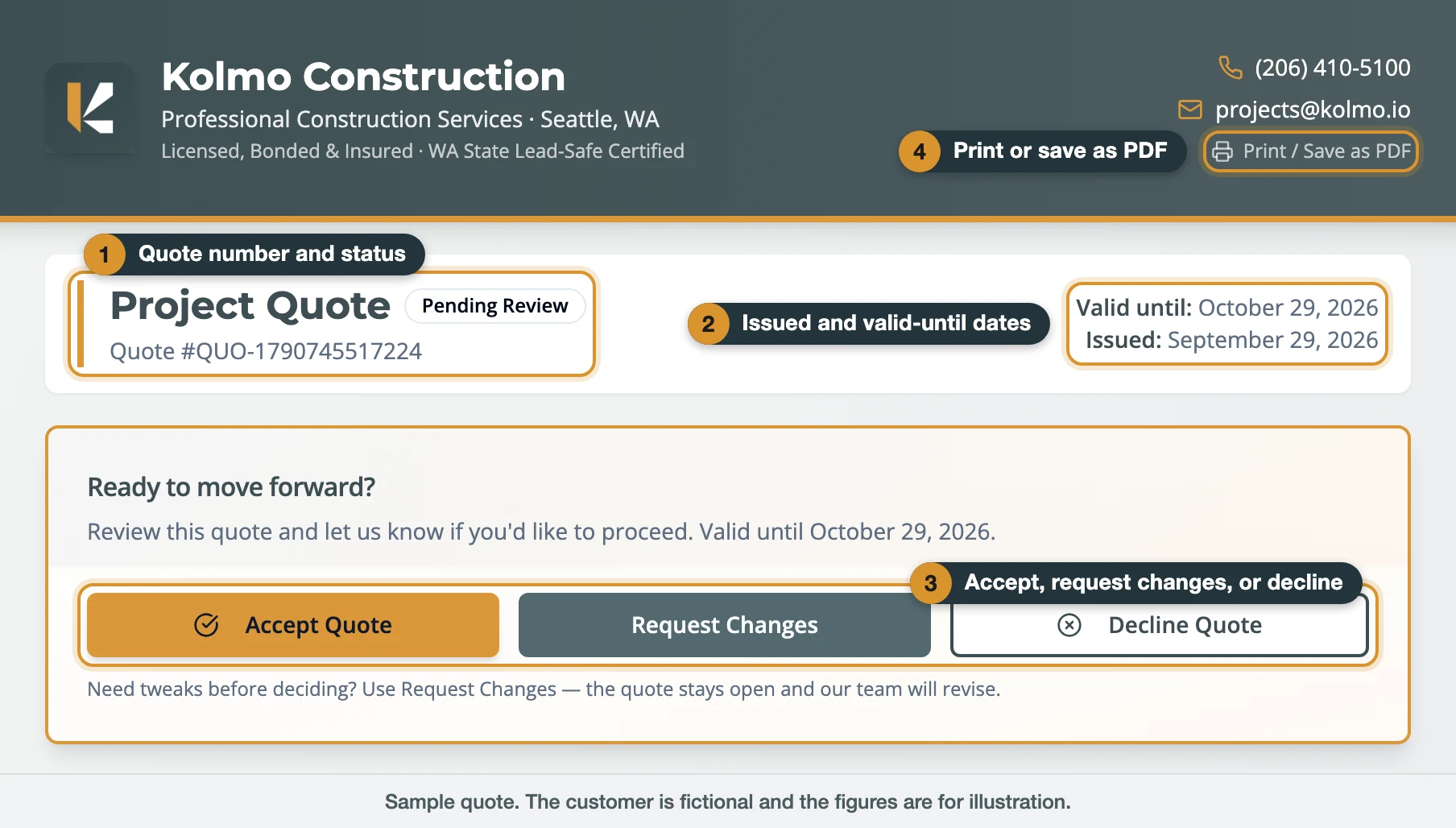
- Quote number and status. The status reads Pending Review until you respond, then Accepted or Declined. Give us the quote number when you call or email and we can pull it up right away.
- Issued and valid-until dates. The price holds through the valid-until date.
- Accept, Request Changes, Decline. The three ways to respond, covered below.
- Print / Save as PDF. Opens a printable copy with the same figures, the terms, and signature lines for you and for Kolmo.
Scope, dates, permits, and the total
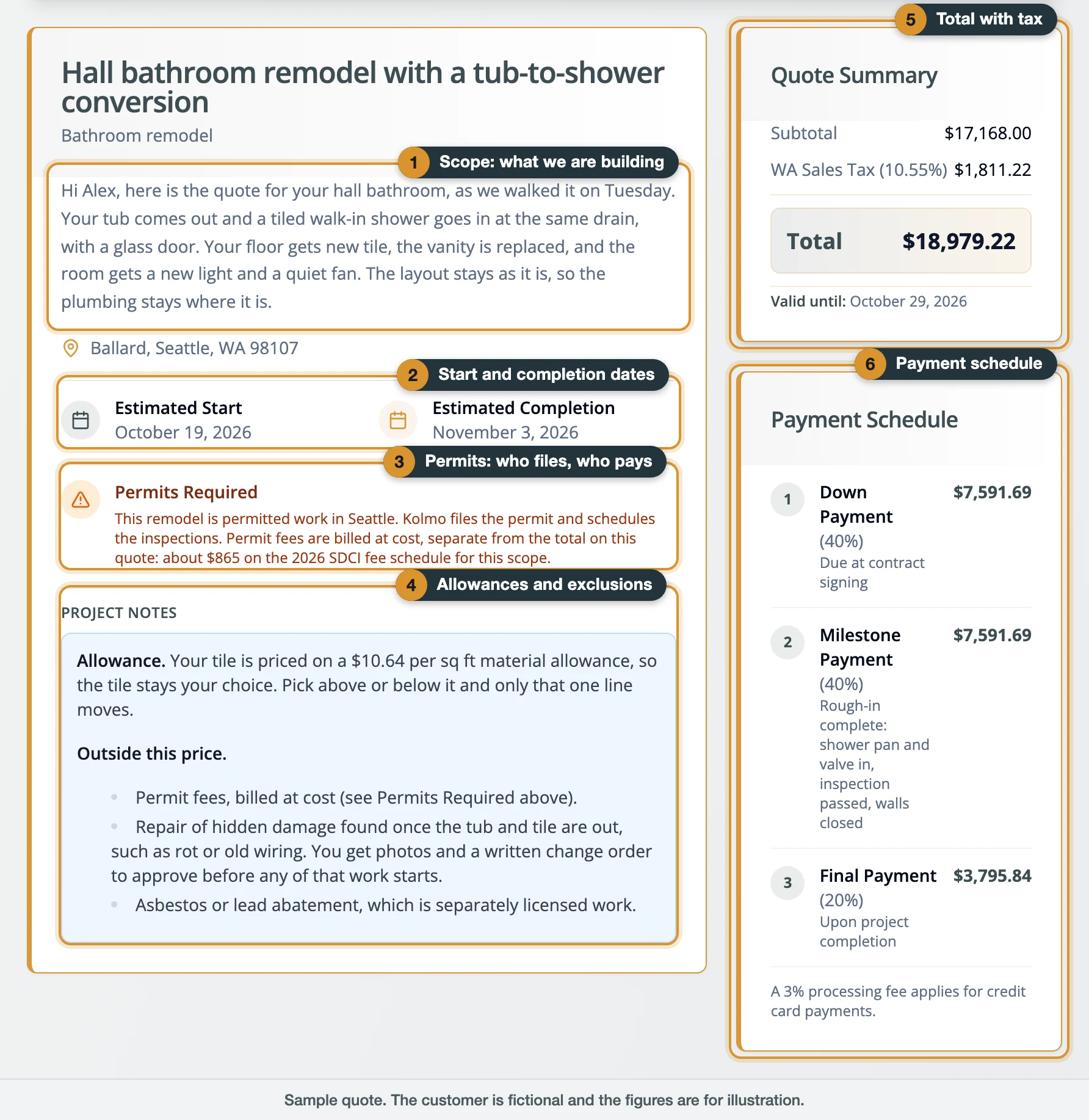
- Scope. A short description written for your job: what is being built or replaced, and what stays as it is. Read this first. The prices below are built on it.
- Start and completion dates. Estimates, shown when they are known. We set the actual dates with you after you accept.
- Permits. When the work needs a permit, this block says so, and says that Kolmo handles the permitting for you. Where it carries details, they name the permits involved and how the fee is handled: as a line in the breakdown, or billed at cost outside the total.
- Project Notes: allowances and exclusions. An allowance is a stated budget for a finish you have yet to choose, such as tile at a set price per square foot. Choose above or below it and only that one line moves. Exclusions are the items the price leaves out. Common ones are permit fees, repair of hidden damage found once a wall or floor is open, and asbestos or lead abatement, which is separately licensed work.
- Total with tax. Subtotal, Washington sales tax, and the total.
- Payment schedule. Each payment as a percentage and a dollar amount, with when it is due.
The cost breakdown: individual costs, labor and materials
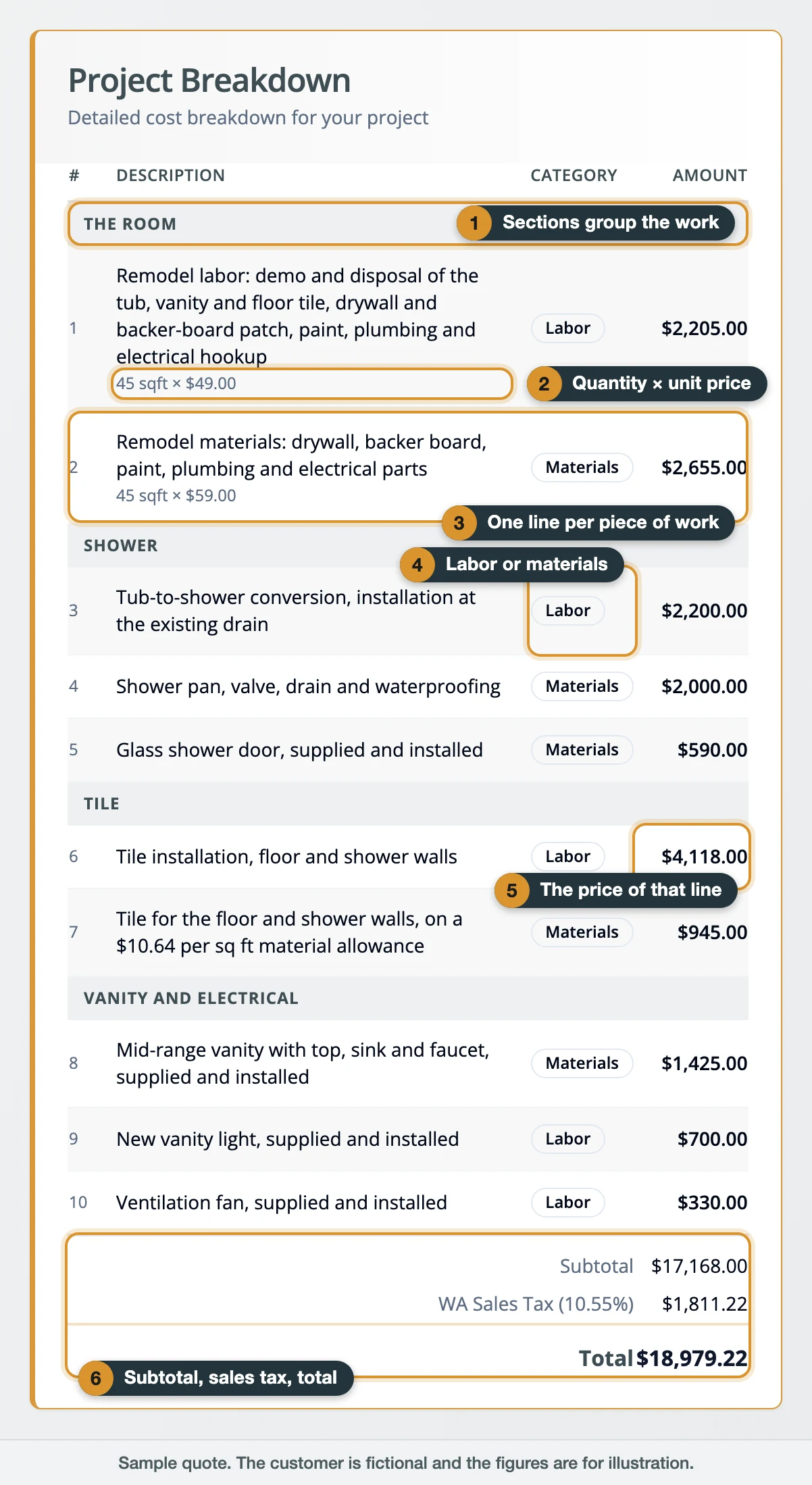
- Sections group the lines by area or trade, so a bathroom reads as room, shower, tile, vanity.
- Quantity × unit price appears on any line that is measured, such as 45 sq ft × $49.00. A lump-sum line shows one price.
- One line per piece of work. The lines follow the scope you asked for, one for one. Each line carries what it takes to deliver that work, so prep, protection and cleanup sit inside the line unless the quote lists them on their own.
- Labor or materials. Every line carries a category, such as labor, materials, equipment, permits, subcontractor or discount.
- The price of that line. A line marked Free is an extra we are doing at no charge. A green line with a minus sign is a discount or a credit.
- Subtotal, sales tax, total. Sales tax is the combined state and local rate at the job address, taken from the Washington Department of Revenue's rate lookup. In Seattle that rate is 10.55% as of September 2026.
If work you expect is missing from both the scope and the breakdown, it is outside the price. Use the question box and we will add it or explain where it sits.
How the payment schedule is set
The schedule follows the size of the job, before tax:
| Job size (before tax) | Payments |
|---|---|
| Under $5,000 | 50% at signing, 50% at completion |
| $5,000 and up | 40% at signing, 40% at a milestone named on your quote, 20% at completion |
The milestone is written in plain terms on the quote. On the sample bathroom it reads "Rough-in complete: shower pan and valve in, inspection passed, walls closed." A job built in phases can carry a schedule written for that job, and the page always shows the one that applies to you. When paying by card carries a processing fee, the fee is printed under the schedule.
What can you do on the quote page?
You can do everything on the quote page short of the work itself: choose between priced options, add or remove extras, ask a question, upload photos or plans, pick colors on a painting quote, book a walkthrough, request changes, print or save a PDF, and accept or decline. Questions, files, change requests and responses reach our office the moment you send them. Asking, uploading and requesting changes all leave the quote open.
Every action at a glance
- Compare materials or tiers. Use the option picker in the breakdown. The total and every payment update as you choose.
- Add an upgrade. Open "Add upgrades or extras." The extra joins the list with its price, and the ✕ removes it.
- Ask something. Use "Have a question?" We reply by email within one business day.
- Show us something. Use "Share photos or files." It takes up to 8 files of 15 MB each, images or PDF.
- Change scope, material, timing or price. Use Request Changes. The quote stays open while we revise and re-send.
- Have us see the job first. Use Schedule walkthrough. Offer two or three times and we confirm one.
- Keep a copy. Use Print / Save as PDF for a printable copy with the terms.
- Go ahead. Use Accept Quote. Your selections are recorded and we contact you to schedule.
- Pass. Use Decline Quote. The quote closes, and a note on why is welcome.
Choosing options and extras
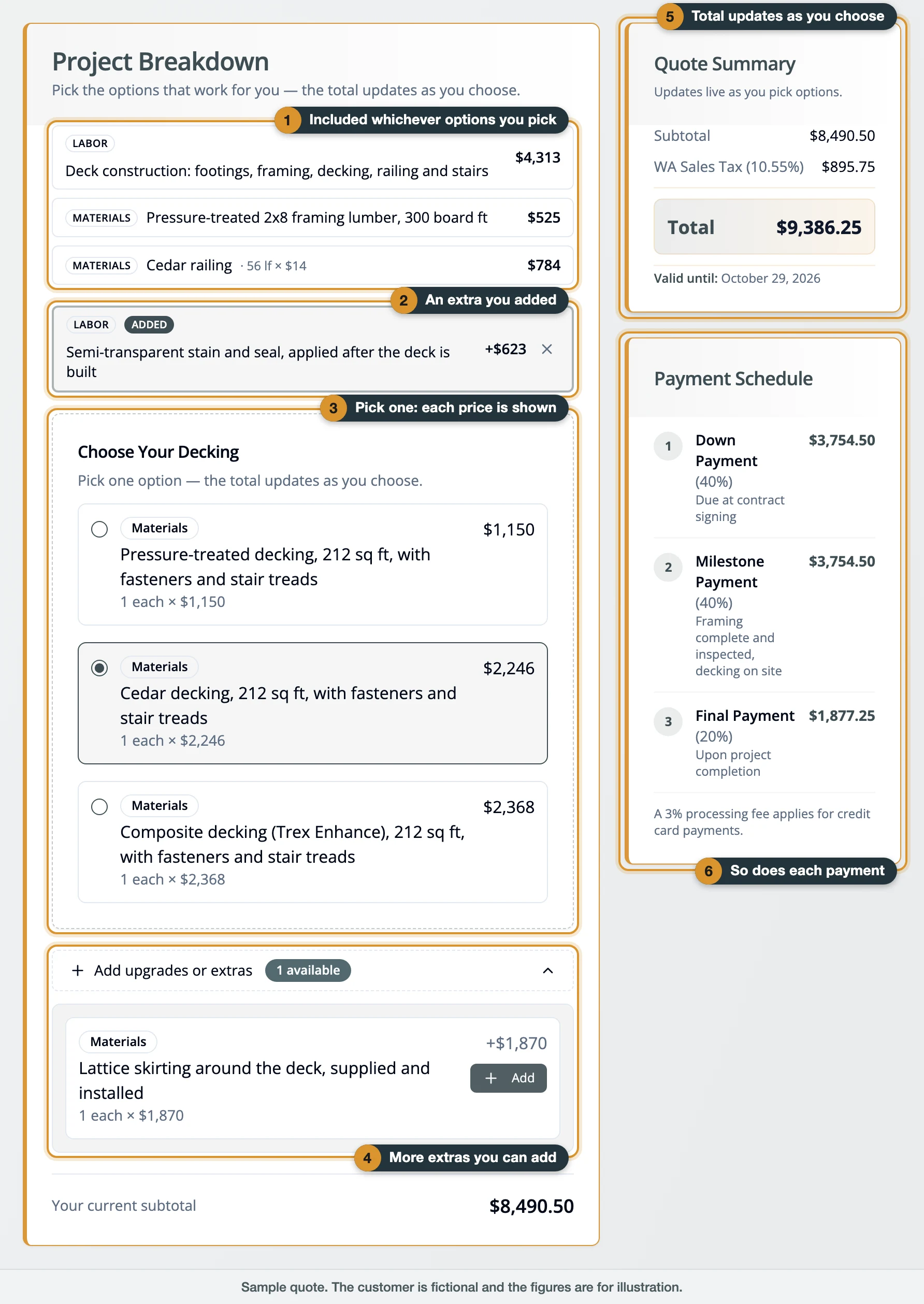
When a material or a tier is your call, the quote prices every choice side by side. On this sample deck, the framing, railing and labor are included whichever decking you pick (1). An extra you add joins the list with its price (2). The decking is a pick-one group with the price of each option shown (3), and any remaining extras wait in a collapsed list (4). The total (5) and each payment (6) recalculate as you click. When you accept, the options selected at that moment are the ones recorded.
Two variations use the same idea. A design quote shows each option as a picture card under "Choose Your Design." A painting quote adds a color section where you pick a color for each surface, and we confirm each one with a physical sample before any paint goes on.
Asking a question or sending photos
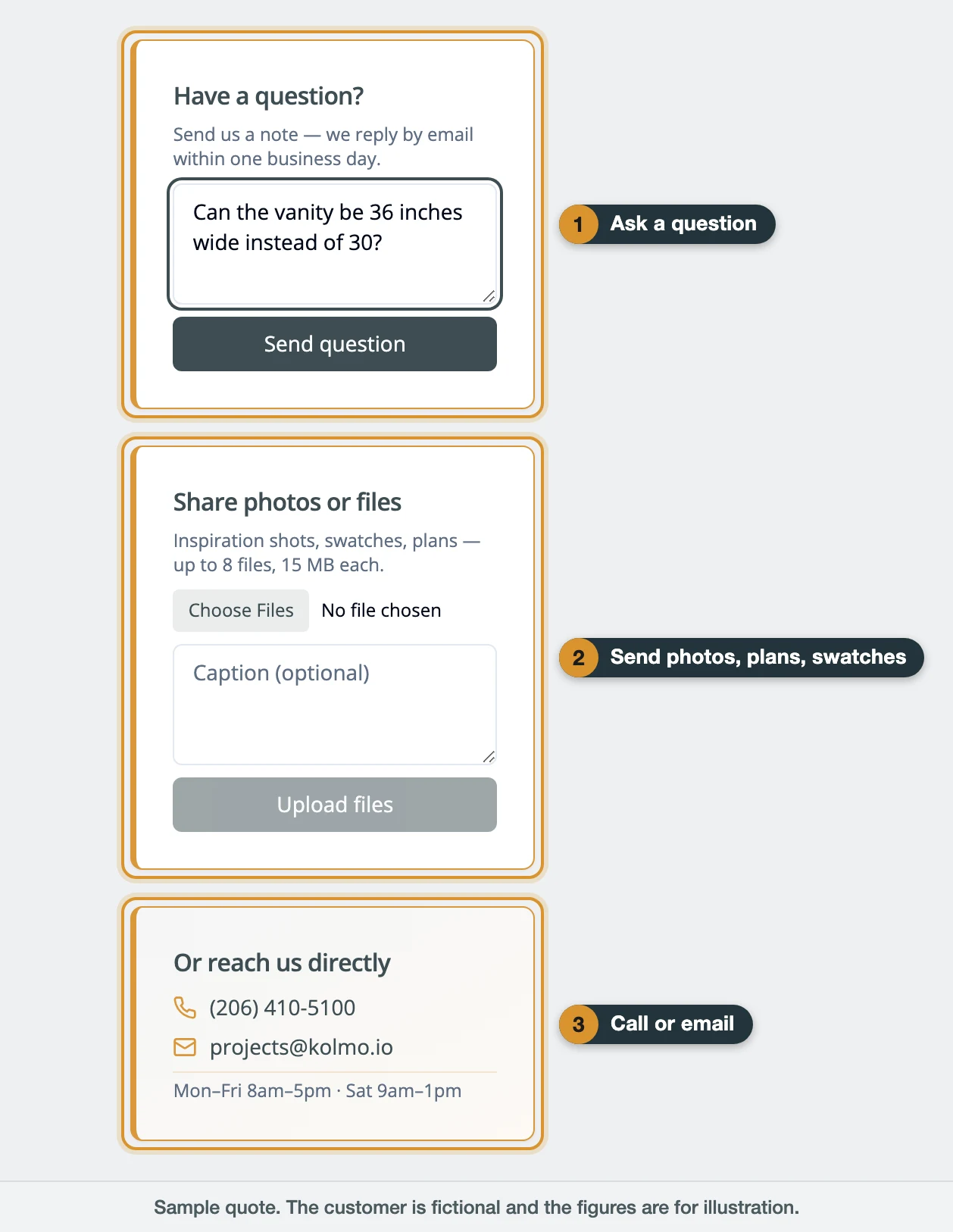
The question box (1) sends your note straight to our office, and we reply by email within one business day. The upload card (2) takes inspiration photos, plans and swatches. The contact card (3) has the direct line, (206) 410-5100, and projects@kolmo.io. Office hours are Monday to Friday 8 to 5 and Saturday 9 to 1.
Requesting changes
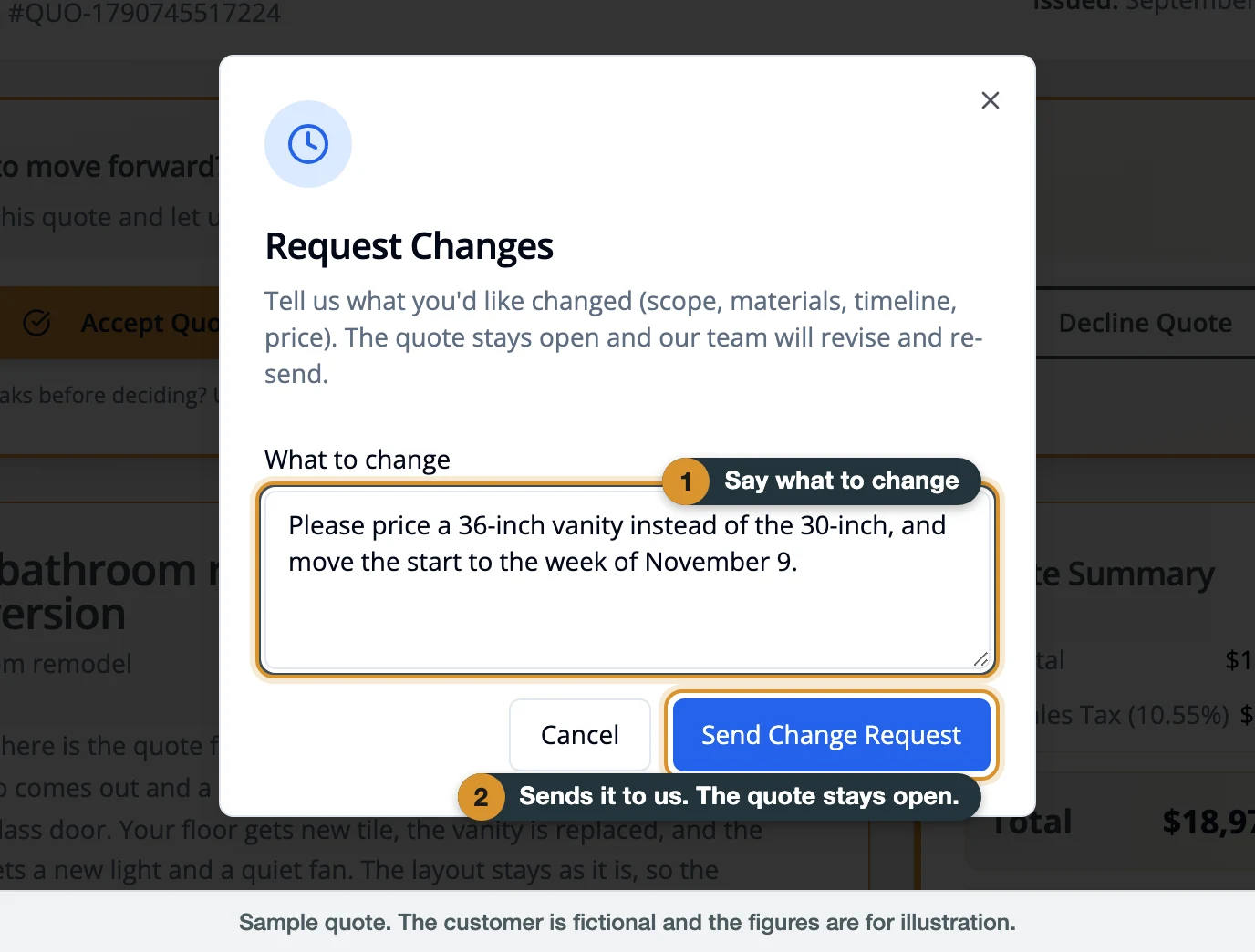
Request Changes is for anything you want different: scope, materials, timing, or price. Write it in your own words and send. The page confirms "Change request received" and shows your request back to you. The quote stays open while we revise it and send the updated version.
Accepting or declining
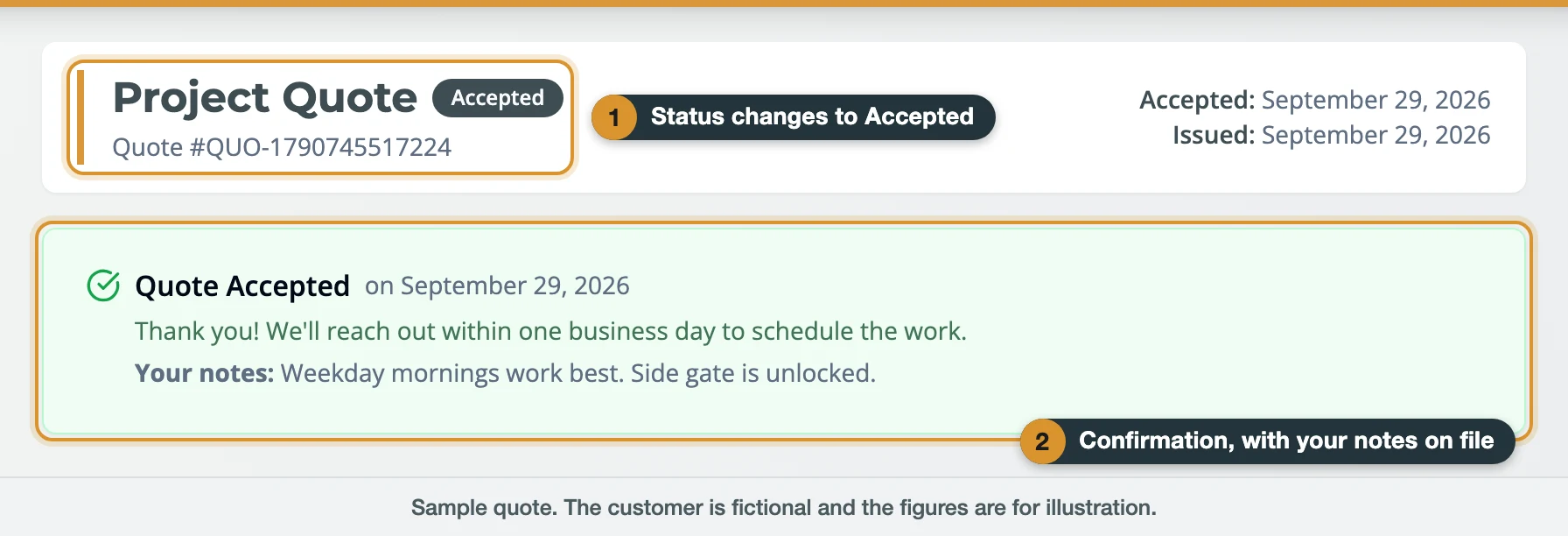
Accept Quote opens a short form for anything we should know, such as preferred start dates or how to get into the yard, and one more click confirms. The status at the top changes to Accepted with the date, and your notes appear in the confirmation. Decline Quote asks, optionally, what we could have done better. Once a quote has a response the buttons are gone. To change a response, call (206) 410-5100.
Booking a walkthrough when the quote came first
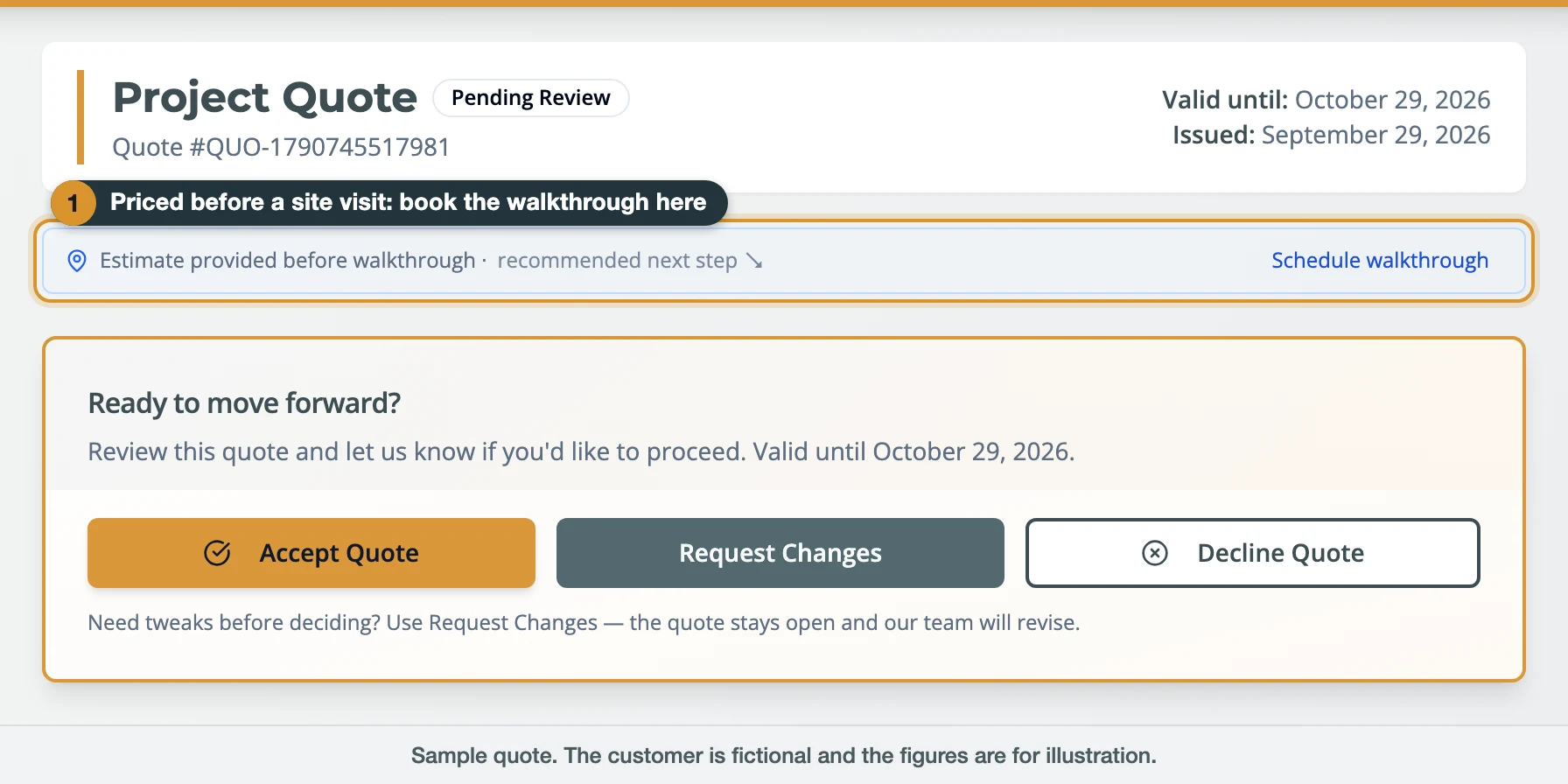
Kolmo can price a job before a site visit, from the photos and measurements you send. Those quotes carry a line at the top, "Estimate provided before walkthrough," with a Schedule walkthrough link.
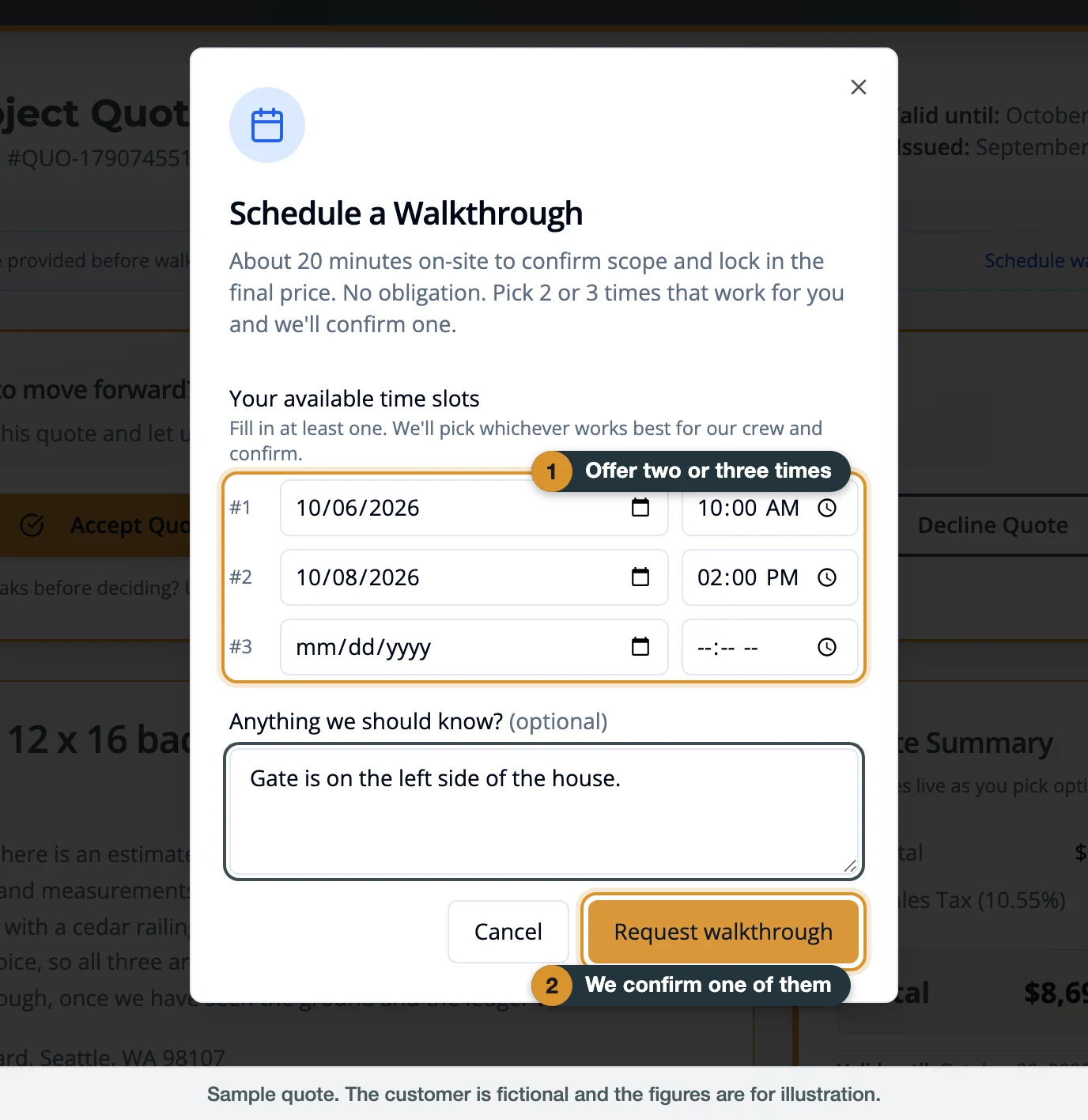
The walkthrough takes about 20 minutes on site. It confirms the scope and locks in the final price, with no obligation. Offer two or three times that work for you and we confirm one. The line on your quote then shows the confirmed date and time.
What happens after you accept a Kolmo quote?
After you accept, the page confirms it on the spot, and we contact you within one business day to schedule the work. From there the job runs in a fixed order, and each step ties back to something printed on the quote you accepted: the payment schedule, the permits block, the scope and the warranty.
The steps, in order
- Confirmation. The quote shows Accepted, the date, and your notes. Print or save a copy for your records.
- Scheduling. We call or email within one business day to set the start date with you.
- First payment. The first payment on your schedule is due at signing. When a payment is invoiced online, the Payment Schedule on your quote page becomes a Payments panel that lists each invoice, shows it as paid or due, and links the receipt and its PDF.
- Permits. When the quote says a permit is required, Kolmo handles the permitting for you.
- Changes during the job. A change to the scope is written up as a change order with its own price. It arrives as a page like the quote, and you approve it the same way before that work is done.
- Milestone and final payments. Each is due at the point named on your schedule.
- Warranty. The work carries a 1-year workmanship warranty. Manufacturer warranties on materials pass directly to you.
How long is a Kolmo quote valid?
A Kolmo quote is valid through the valid-until date printed at the top of the page, which for most quotes is 30 days after it was issued. In the last five days a banner on the page counts down to that date. After it passes, the response buttons come off the page and it asks you to contact us for an updated quote. The question box keeps working, so you can ask for a refresh from the same link. Material prices and crew availability move, and the date is what lets us hold a number for you.
Is the price on a Kolmo quote final?
The total on a Kolmo quote is the price for the scope written on it. Three things can move it, and each one is visible on the page: an allowance, when the finish you choose costs more or less than the stated budget; the options and extras you select, which the page totals as you click; and a quote marked "Estimate provided before walkthrough," whose final price is set at the walkthrough. Beyond those, the price changes only through a written change order that you approve first, for example when hidden damage turns up behind a wall.
A checklist before you accept
- The scope paragraph matches what you asked for, including what stays as it is.
- Every piece of work you expect has a line in the breakdown.
- You have read Project Notes for allowances and exclusions.
- If a permit is required, you know how the fee is handled.
- The options you want are the ones selected, and the total reflects them.
- The payment schedule and the milestone wording make sense for your job.
- The valid-until date gives you the time you need.
- The license checks out. Look up KOLMOL*753JS on the Washington L&I Verify a Contractor tool, or see Kolmo's verification page.
Red flags to check in any contractor's quote
Washington's Department of Labor & Industries tells homeowners to "Verify the contractor has an active license," to "Get at least 3 written bids and compare them carefully," and to "Get a written contract, and make sure you understand the terms." When you line up bids, these are the gaps that make a comparison impossible:
- One lump sum with no scope. With nothing written down, there is nothing to compare and nothing to hold anyone to.
- No license number on the document. A Washington contractor's registration takes a minute to check.
- Unwritten exclusions. Permits, disposal and hidden damage are either in the price or outside it. The quote should say which.
- No stated way to handle changes. Changes should be priced and approved in writing before the work is done.
Next steps
Planning a project and want a number before anyone visits? The Kolmo cost calculator gives a Seattle-area planning range online in a few minutes, and How estimates work explains where the figures come from. For a written quote, call (206) 410-5100 or use kolmo.io/contact.
Already have a quote and a question about it? Use the question box on your quote page, or email projects@kolmo.io with your quote number.
Governor / Managing Member, Kolmo LLC
Sources
- Washington State L&I — Hiring a Contractor — accessed 2026-09-29
- Washington State L&I — Verify a Contractor, Tradesperson or Business — accessed 2026-09-29
- Washington Department of Revenue — Sales & use tax rates — accessed 2026-09-29
Related Articles
Explore more content about similar topics and locations
Seattle Deck Cost 2026: $/sqft by Material + Permit Trigger Explained
Real 2026 Seattle deck cost ranges per square foot by material (pressure-treated, cedar, composite, ipé), plus when SDCI requires a permit (the 18" rule) and the all-in cost with railing, posts, and inspection.
Seattle Kitchen Remodel Cost 2026: $18K Refresh to $207K Full Gut
Seattle kitchens run $9.2K–$20.9K cosmetic, $35.8K–$69.2K standard, $59.7K–$108.7K full gut in 2026. Real ranges by size, cabinet grade, SDCI vs. Renton permit fees, and ROI.
How Much Does a Bathroom Remodel Cost in Seattle? (2026 Guide)
Seattle bathroom remodels run $1.7K–$6.5K cosmetic, $13K–$17.5K standard, $22.3K–$45.1K+ full gut in 2026. Real size-by-scope ranges, permit fees, ROI, and a free calculator.
Browse more home renovation articles from Kolmo Construction